

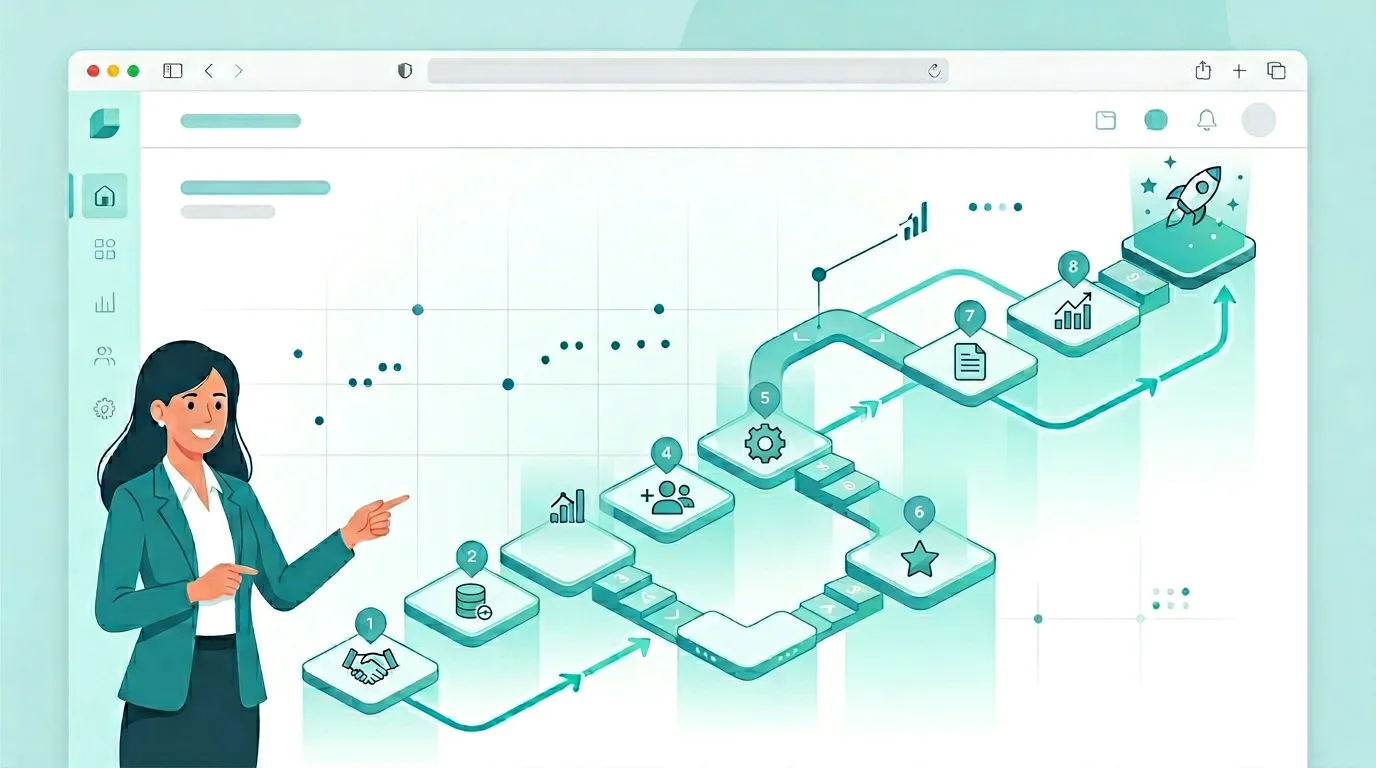
Why Every Product Needs an Onboarding System — And How AntForms Guides Users in 9 Steps (2026)
It’s easy to forget that for the end user, understanding how a new system works is hard. They didn’t build it. They don’t know where to click first, what “blocks” or “workflows” mean, or how to go from an empty screen to a live form. That gap—between what your product can do and what the user actually does—is why every product needs an onboarding system. Without it, you leave users to guess, and guess wrong. In 2026, product onboarding isn’t a nice-to-have; it’s the bridge between signup and value. This article explains why onboarding matters, what the research says, and how AntForms assists users with a simple 9-step onboarding that shows exactly how the platform works—from creating a form to publishing it. For more on turning trials into active users, see SaaS onboarding templates that reduce churn, reduce churn with feedback loops, and exit surveys for churn and retention.
Why Products Require an Onboarding System
Product onboarding is the process of guiding new users to understand how the system works and to reach their first moment of value. Without it, a large share of users never return after the first session.
Builders and makers often assume the product is “obvious.” It isn’t. 40–60% of SaaS free trial users never return after their first session because they don’t reach the “aha moment”—when they experience real value. Poor onboarding is a leading cause of early churn; studies suggest 75% of SaaS churn risk is influenced by the onboarding experience. The fix isn’t more features; it’s clear, step-by-step guidance that answers: Where do I start? What do I do next? How do I know I’ve succeeded? An onboarding system does exactly that: it assists the user so they can understand how the platform works without reading a manual or watching a long video.
The End-User Problem: “How Does This System Work?”
End users struggle to understand how a new system works because they lack the context that creators have. They see buttons, menus, and empty states without a mental model of the journey.
When someone lands in a form builder for the first time, they see a dashboard, a “Create a form” button, and maybe a blank workspace. They don’t automatically know that they should name the form first, then open it, then add “blocks,” then publish. That sequence isn’t obvious—it’s learned. If the product doesn’t teach it, users either bounce or waste time clicking around. Sometimes we forget that for the end user it’s very difficult to understand how the system works. Onboarding exists to close that gap: it highlights the right actions in the right order and explains what each step does. That’s why AntForms and many modern tools invest in a simple onboarding that walks users through the core path: create → name → open → add questions → publish → view live.
What the Research Says: Onboarding and Business Outcomes
Strong onboarding is one of the highest-leverage ways to reduce churn and improve activation. The numbers are striking.
Products with effective onboarding see activation rates of 40–60% and 30-day churn around 7–10%, compared to 15–25% activation and 15–20% churn when onboarding is weak. A 10% improvement in onboarding can translate to 15%+ higher customer lifetime value. Onboarding accounts for a large share of churn variance—often 30–50%—which makes it a critical area to improve. Key practices that work: time-to-value under 5 minutes, 3–7 core steps (longer flows see big drops in completion), progress indicators (e.g. “Step 3 of 9”), and contextual tooltips that point to the next action instead of overwhelming with a wall of text. For form builders and SaaS aimed at makers, a guided product tour that shows “create form → add questions → publish” aligns with how people actually learn: by doing, one step at a time. Personalization (e.g. by user role or goal) can lift 7-day retention by 35%, but even a single, well-designed path—like AntForms’ 9 steps—beats no path at all. The goal is always the same: assist the user so they understand how the system works and reach their first win without leaving the product.
What Good Onboarding Does
Good onboarding shortens time-to-value, reduces confusion, and gives users a clear path to their first win. It answers “what do I do next?” at every step.
Effective onboarding doesn’t dump every feature on the user. It focuses on one primary outcome—for a form builder, “create and publish your first form”—and removes friction along that path. Best practices include: progressive disclosure (show only what’s needed now), skippable tours so experienced users aren’t slowed down, visual progress (“Step 3 of 9”) so users know how much is left, and plain-language instructions (“Click here to create your first form”) instead of jargon. When done well, users complete the flow, see their form live, and think I get it. That moment is the aha moment; onboarding is the system that gets them there.
The Cost of Skipping Onboarding
Products that skip or underinvest in onboarding pay in higher early churn and lower activation. The first few days are make-or-break: 75% of new users abandon products within the first week if they don’t experience value quickly, and users who don’t engage meaningfully within 72 hours carry a 90% churn probability. Average product tour completion rates sit between 10–25% when tours are long or generic—meaning most users skip—but short, contextual tours (like AntForms’ 9 steps) see better completion because they’re focused and quick. The lesson: onboarding that assists the user without overwhelming them is a direct lever on retention and revenue. For teams building form builders or any SaaS, treating “how does the platform work?” as a first-class question—and answering it in the product—is one of the highest-ROI improvements you can make.
How AntForms Assists Users: A Simple 9-Step Onboarding
AntForms assists users with a simple 9-step onboarding that explains how the platform works, from creating a form to publishing and viewing it live. Each step is indicated in the UI with a tooltip and a progress label (e.g. “Step 3 of 9”).
The flow is designed so new users are never left staring at an empty screen without direction. Below we walk through the nine steps in order, matching the sequence a user sees in the product (by time). The screenshots illustrate each step so you can see how AntForms assists the user at every stage. Each image corresponds to the step number and the exact UI state at that moment in the onboarding—from the welcome dialog through to “You’re all set.”
Welcome and Step 1: Create a Form
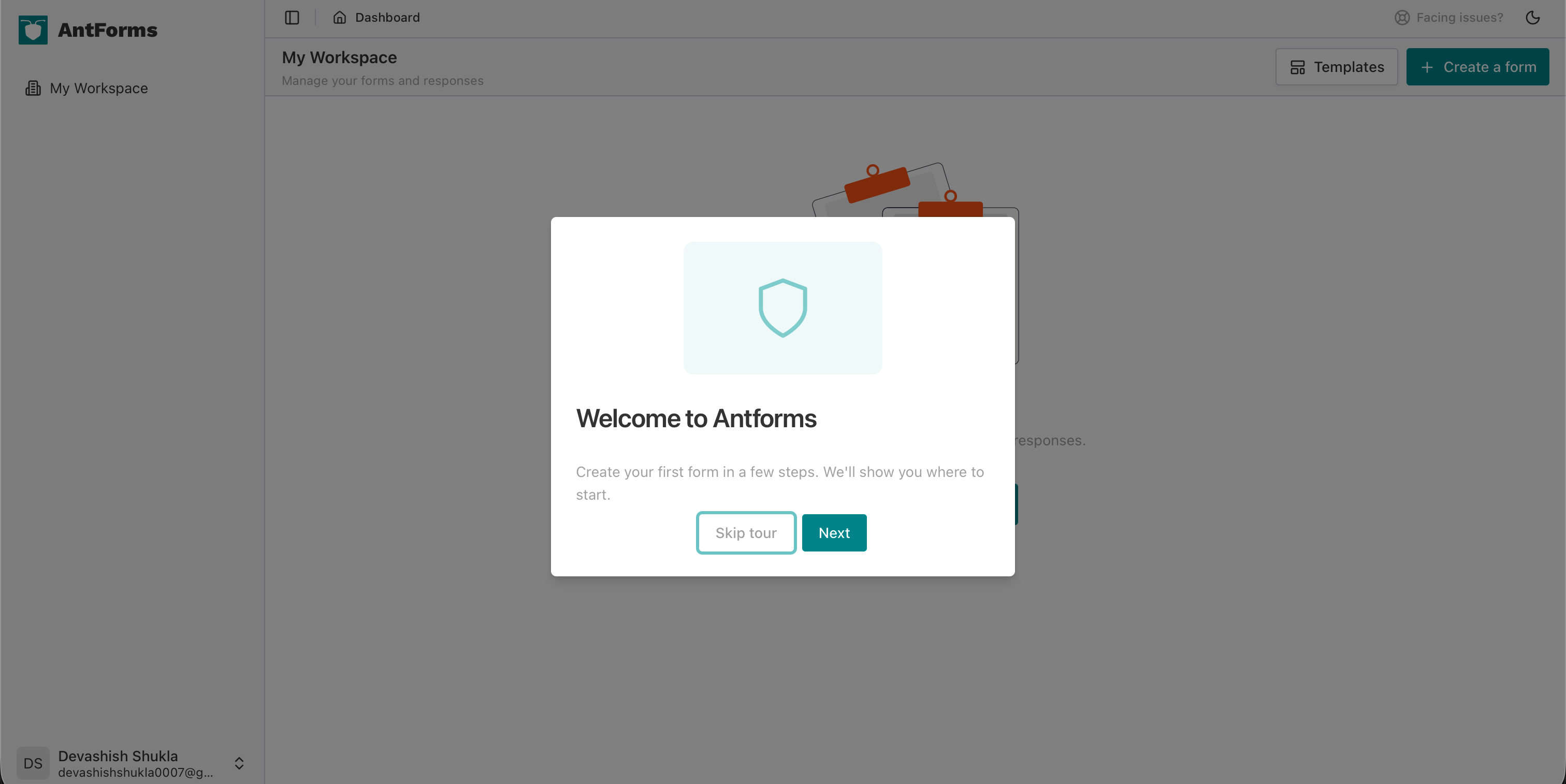
First, the user sees a Welcome to Antforms dialog: “Create your first form in a few steps. We’ll show you where to start.” They can choose Next to begin the tour or Skip tour if they prefer to explore on their own.
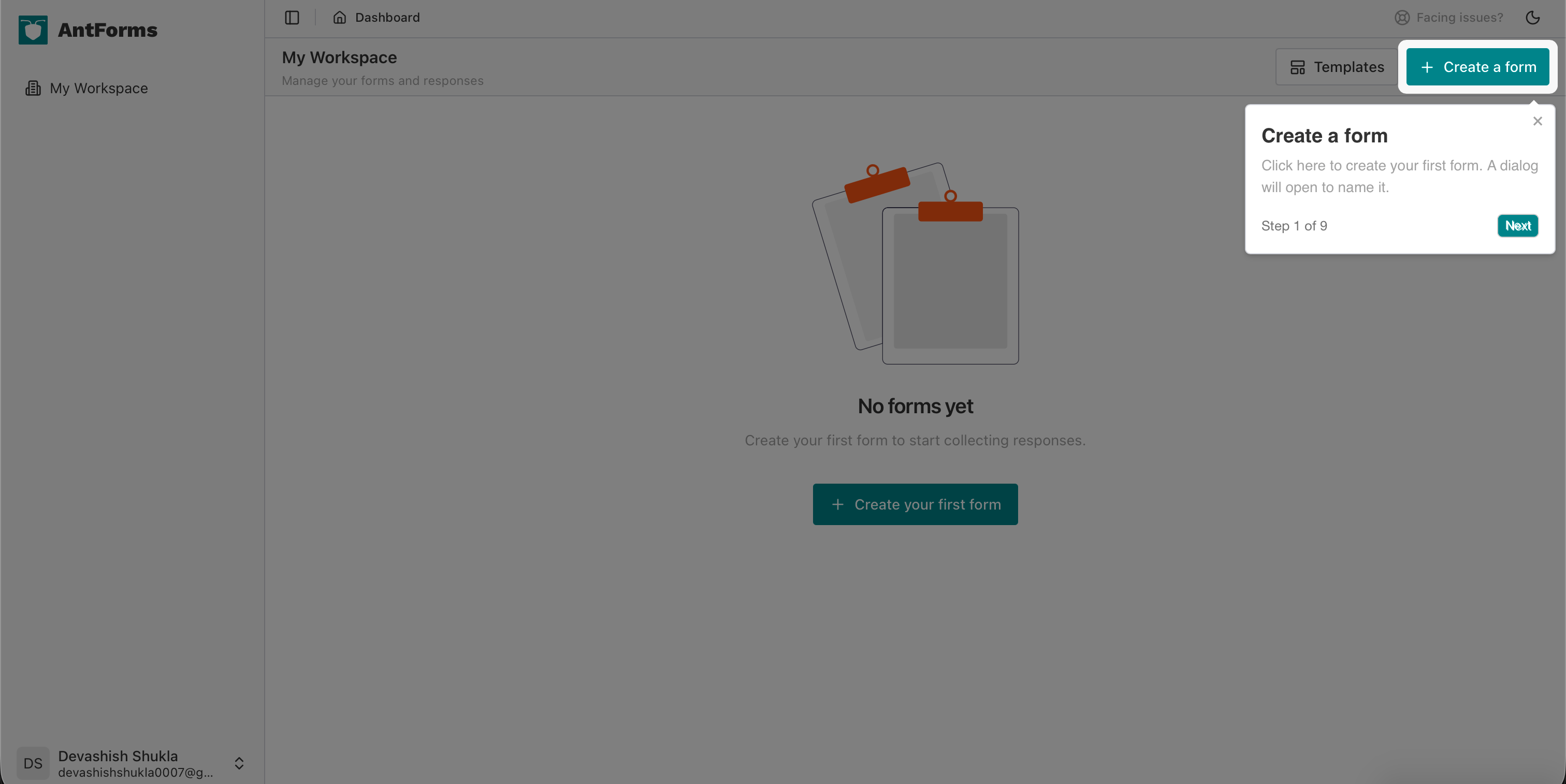
Step 1 of 9 directs them to the main call-to-action: “Create a form.” The tooltip says: “Click here to create your first form. A dialog will open to name it.” This removes the guesswork—the user knows exactly where to click.
They may also see a Welcome to Antforms dialog: “Create your first form in a few steps. We’ll show you where to start.” They can choose Next to begin the tour or Skip tour if they prefer to explore on their own.
Steps 2 and 3: Name Your Form and Create It
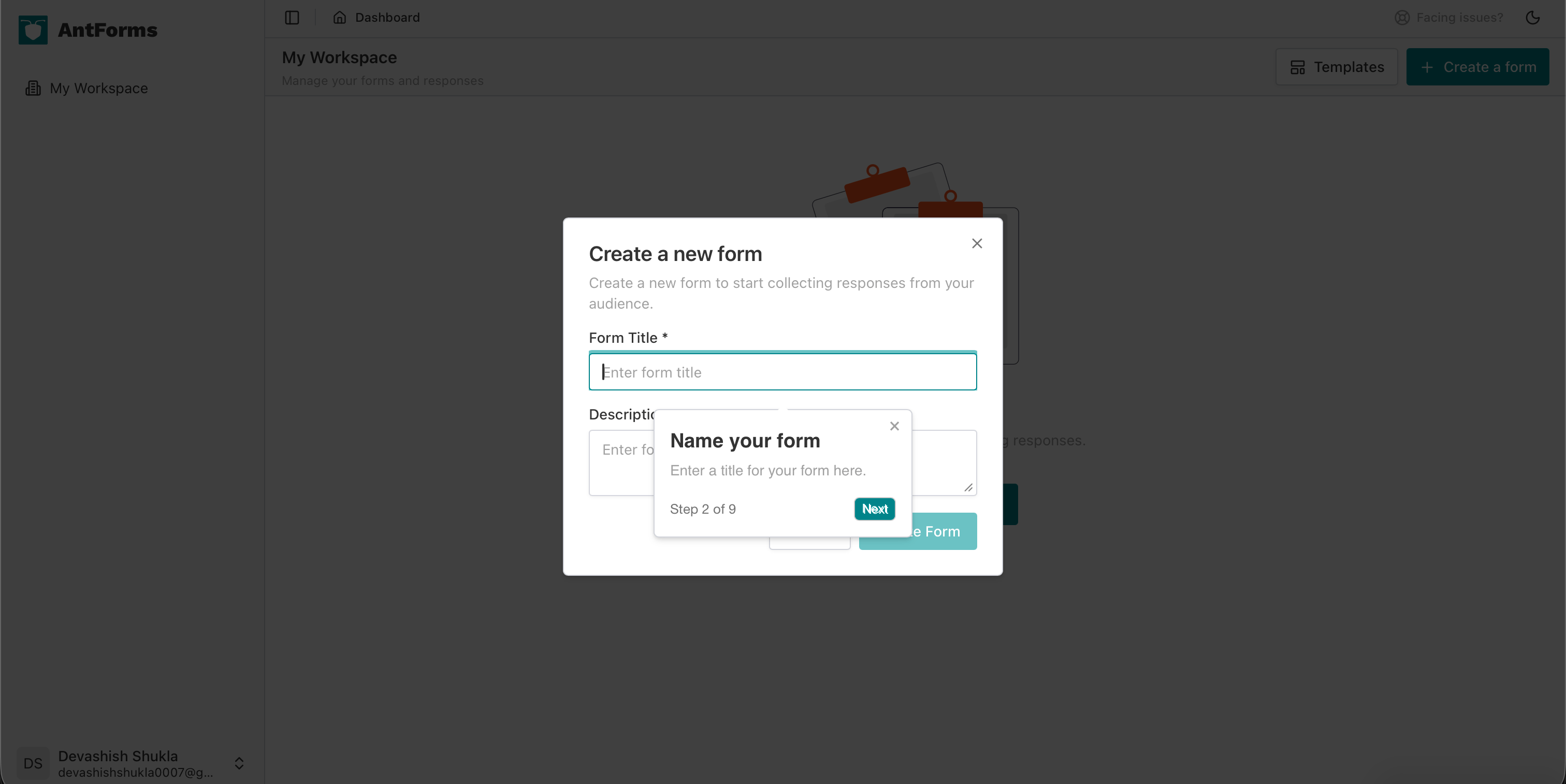
Step 2 of 9 is “Name your form.” The tooltip overlays the Create a new form dialog and says: “Enter a title for your form here.” The user types a form title (e.g. “First form”) and can add an optional description.
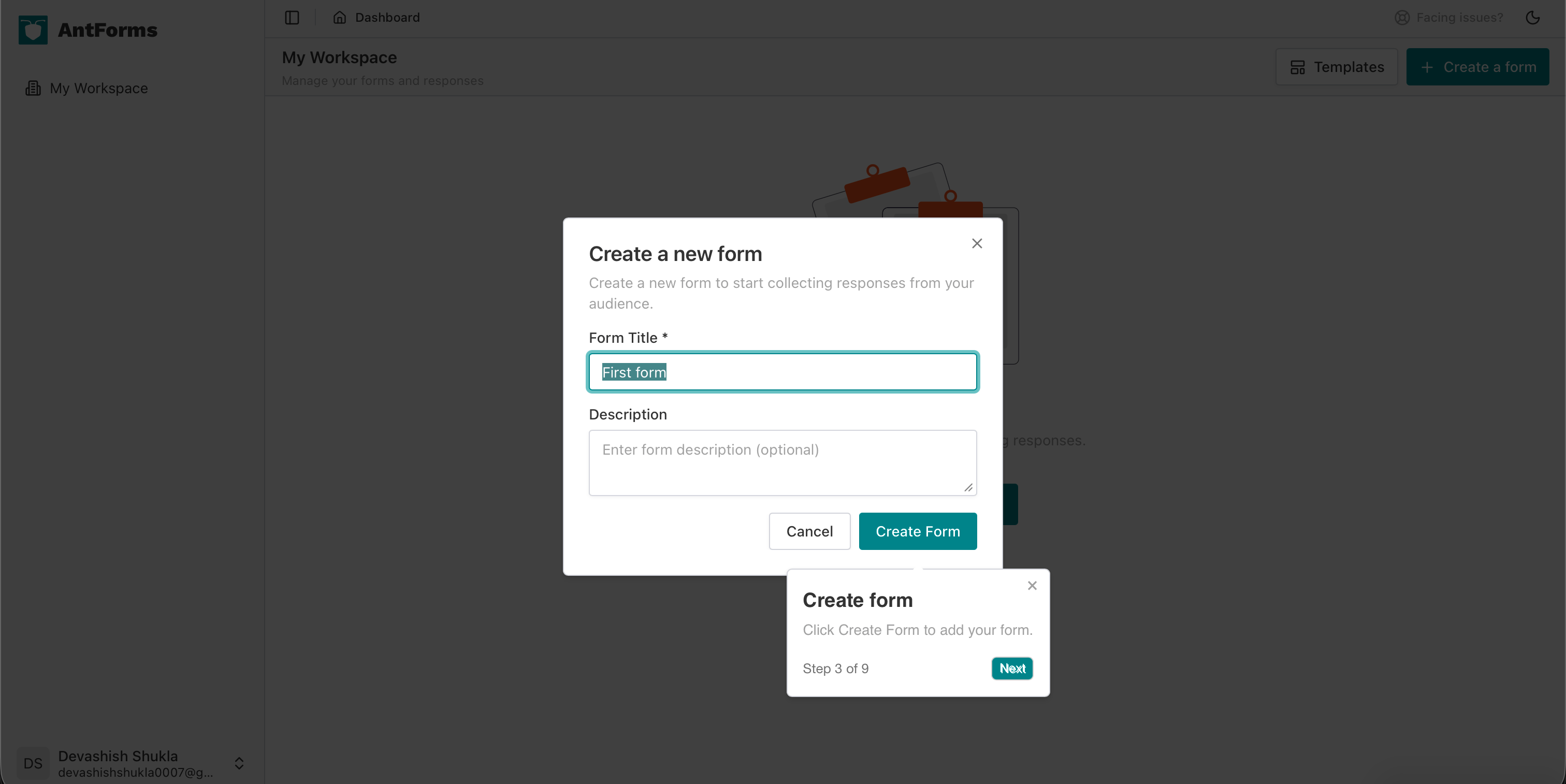
Step 3 of 9 is “Create form.” The instruction is: “Click Create Form to add your form.” The user clicks the green Create Form button and the form is created.
Step 4: Open Your Form
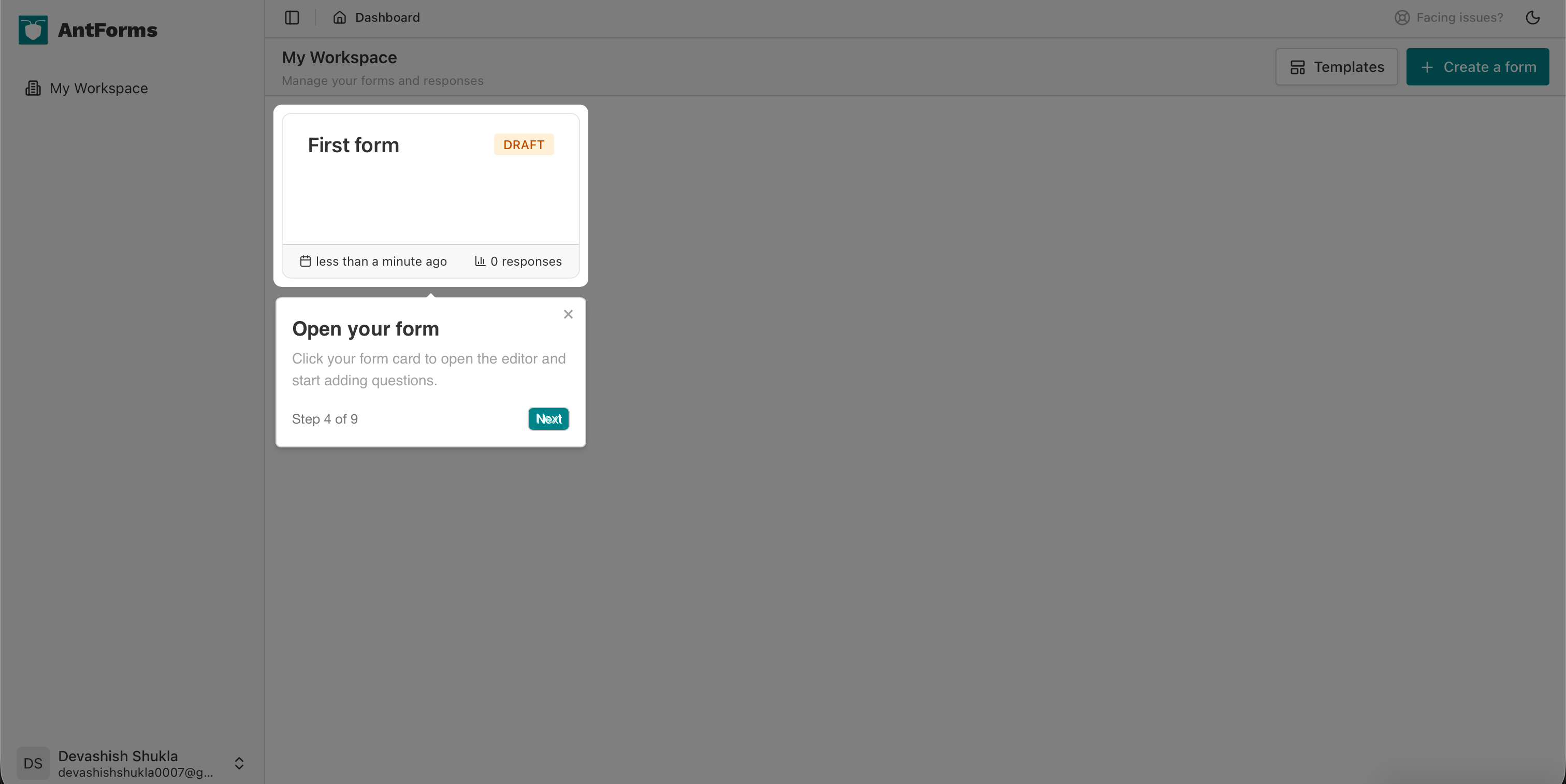
Step 4 of 9 is “Open your form.” Back on the workspace, the user sees their form card (e.g. “First form” with a DRAFT badge). The tooltip says: “Click your form card to open the editor and start adding questions.” This connects “I created a form” to “I’m now in the builder.”
Steps 5 and 6: Add a Question and Choose a Type
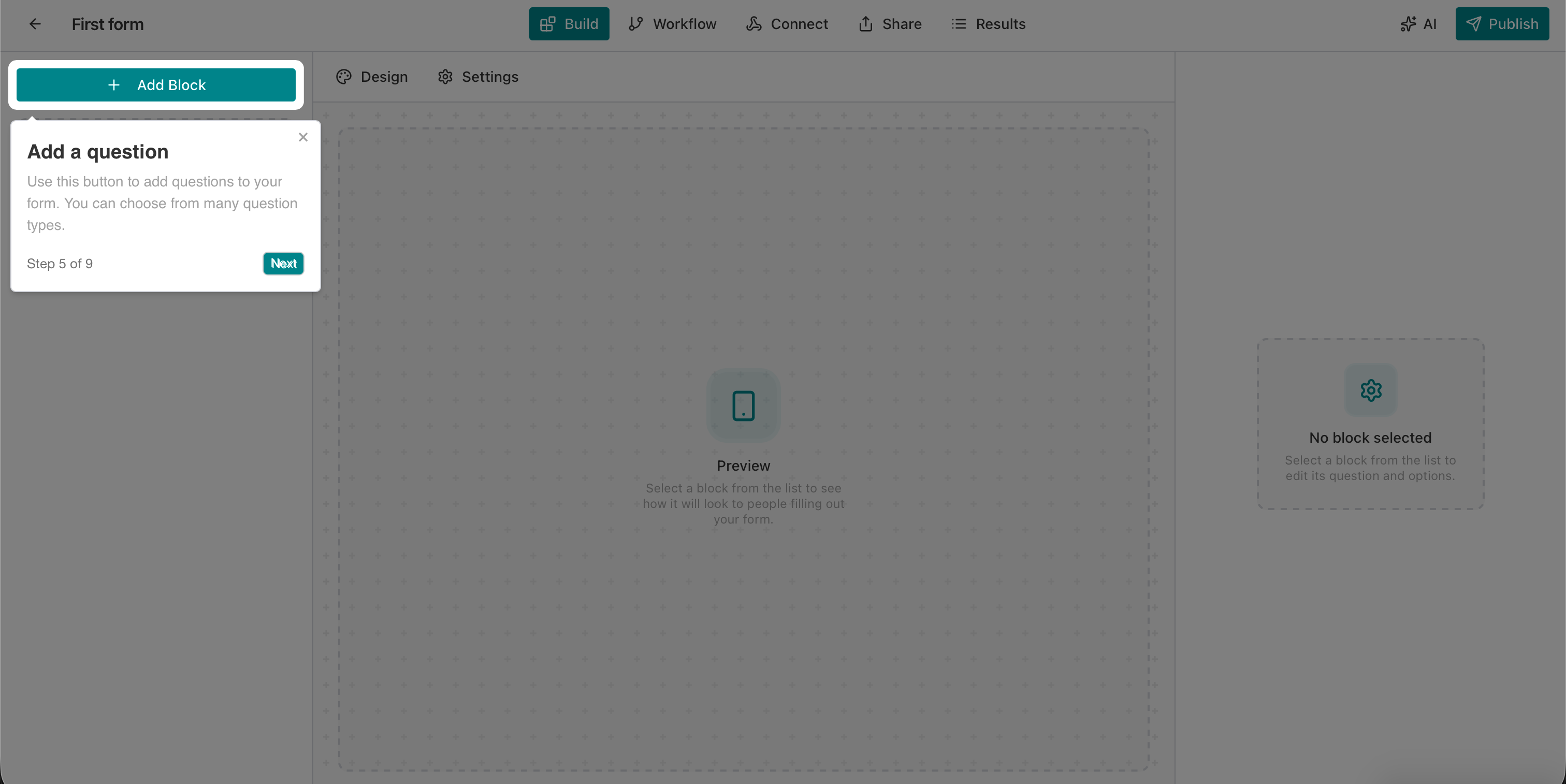
Step 5 of 9 is “Add a question.” In the Build view, the tooltip highlights the + Add Block button: “Use this button to add questions to your form. You can choose from many question types.” The user learns that questions are added as “blocks” and that there are multiple types.
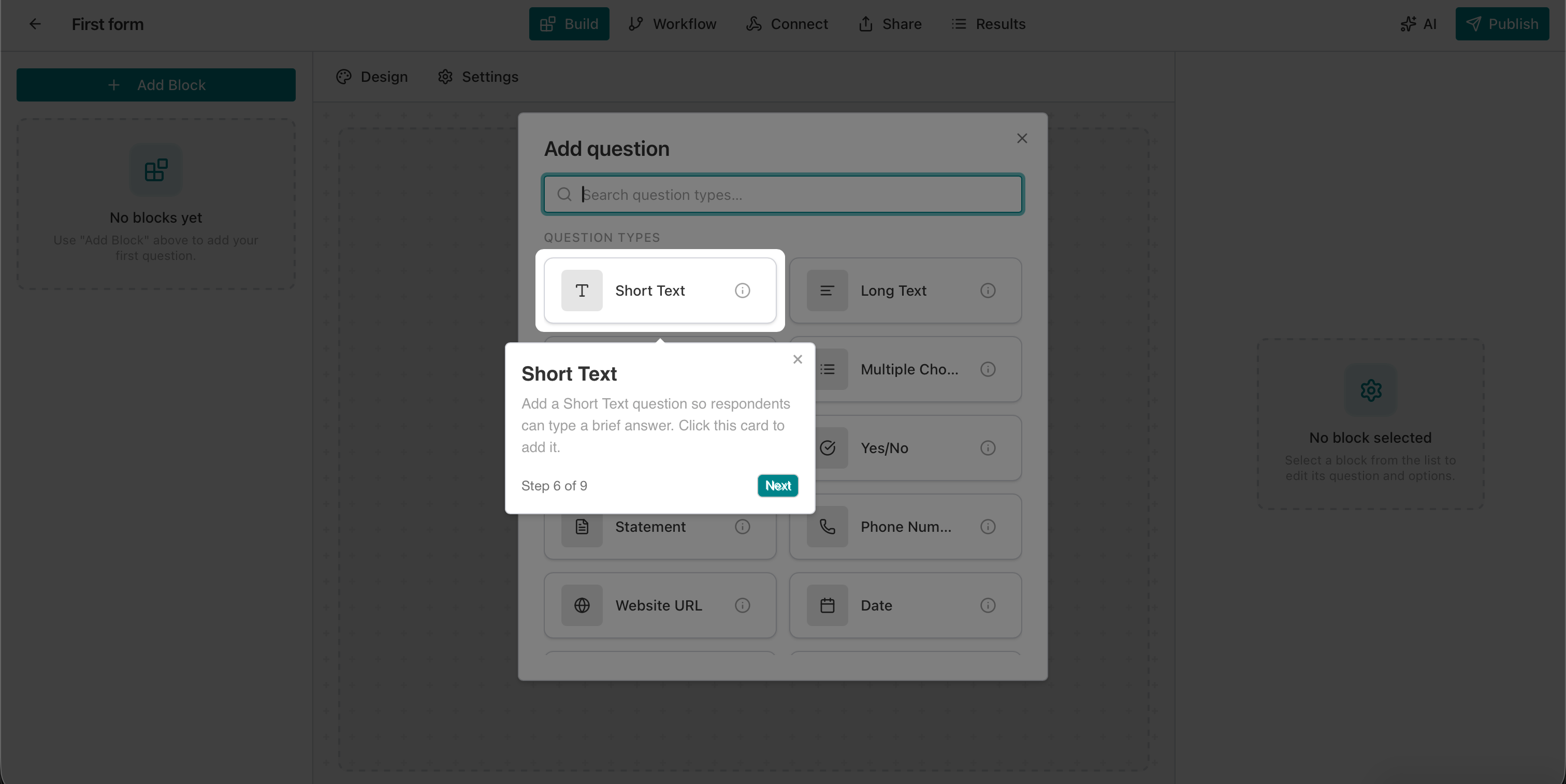
Step 6 of 9 focuses on “Short Text.” When the Add question modal opens, the tooltip explains: “Add a Short Text question so respondents can type a brief answer. Click this card to add it.” The user selects Short Text (or another type) and adds their first question to the form.
Steps 7 and 8: Publish and Open the Live Form
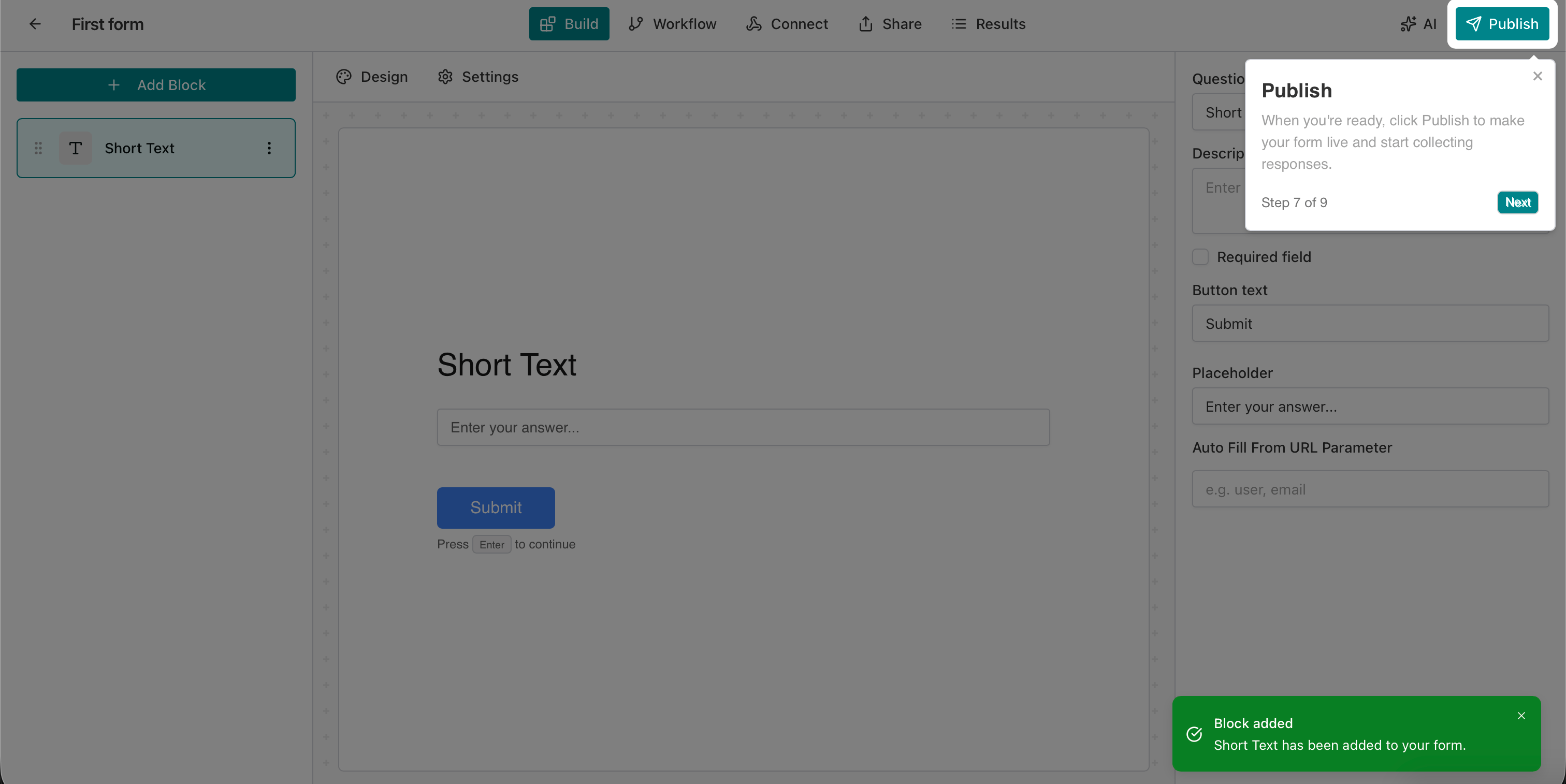
Step 7 of 9 is “Publish.” The tooltip points to the Publish button in the top bar: “When you’re ready, click Publish to make your form live and start collecting responses.” This makes the outcome explicit: the form goes from draft to live.
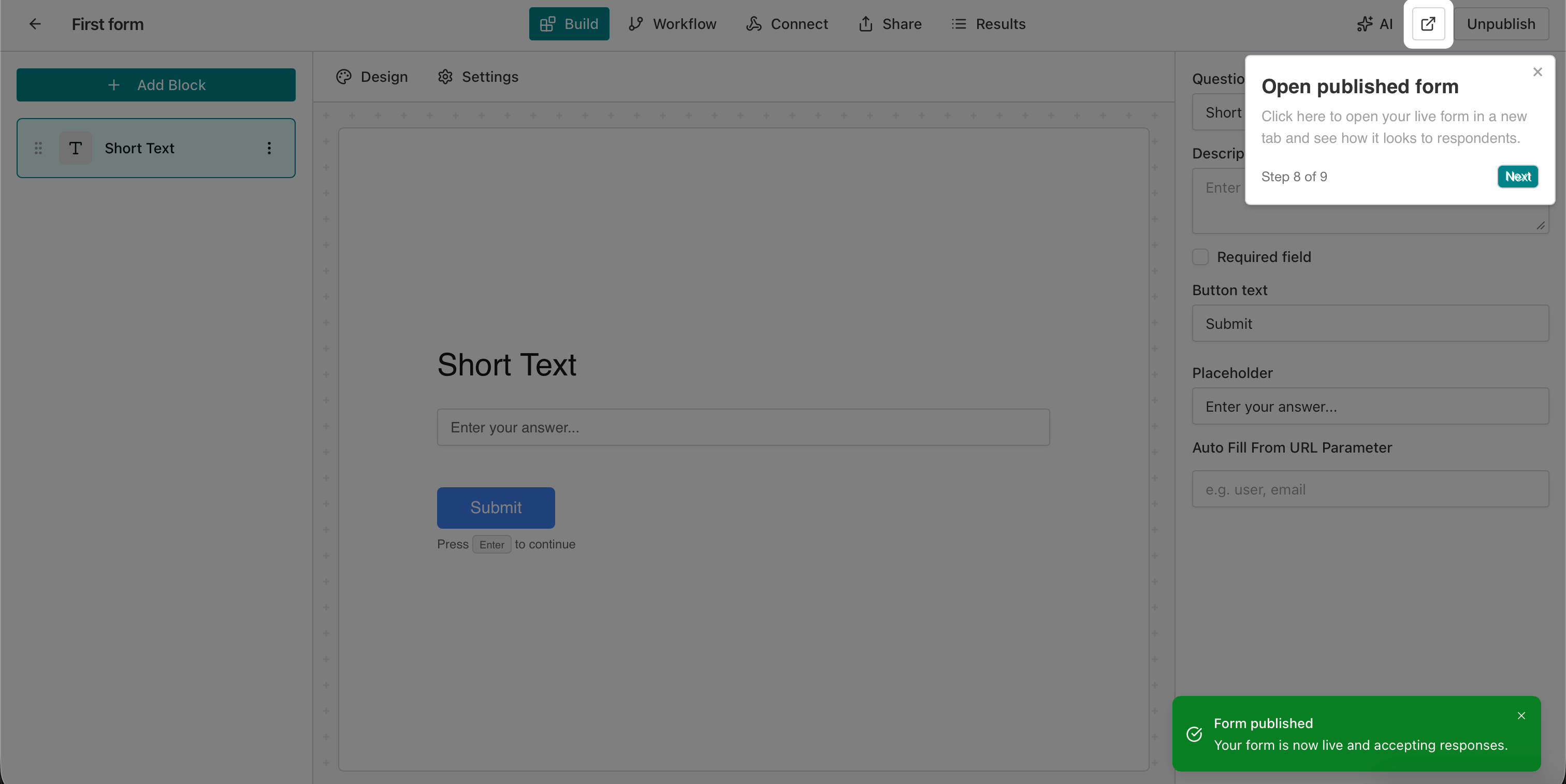
Step 8 of 9 is “Open published form.” After publishing, the user sees a success message and the tooltip says: “Click here to open your live form in a new tab and see how it looks to respondents.” They can verify the form as their audience will see it.
Step 9: You’re All Set
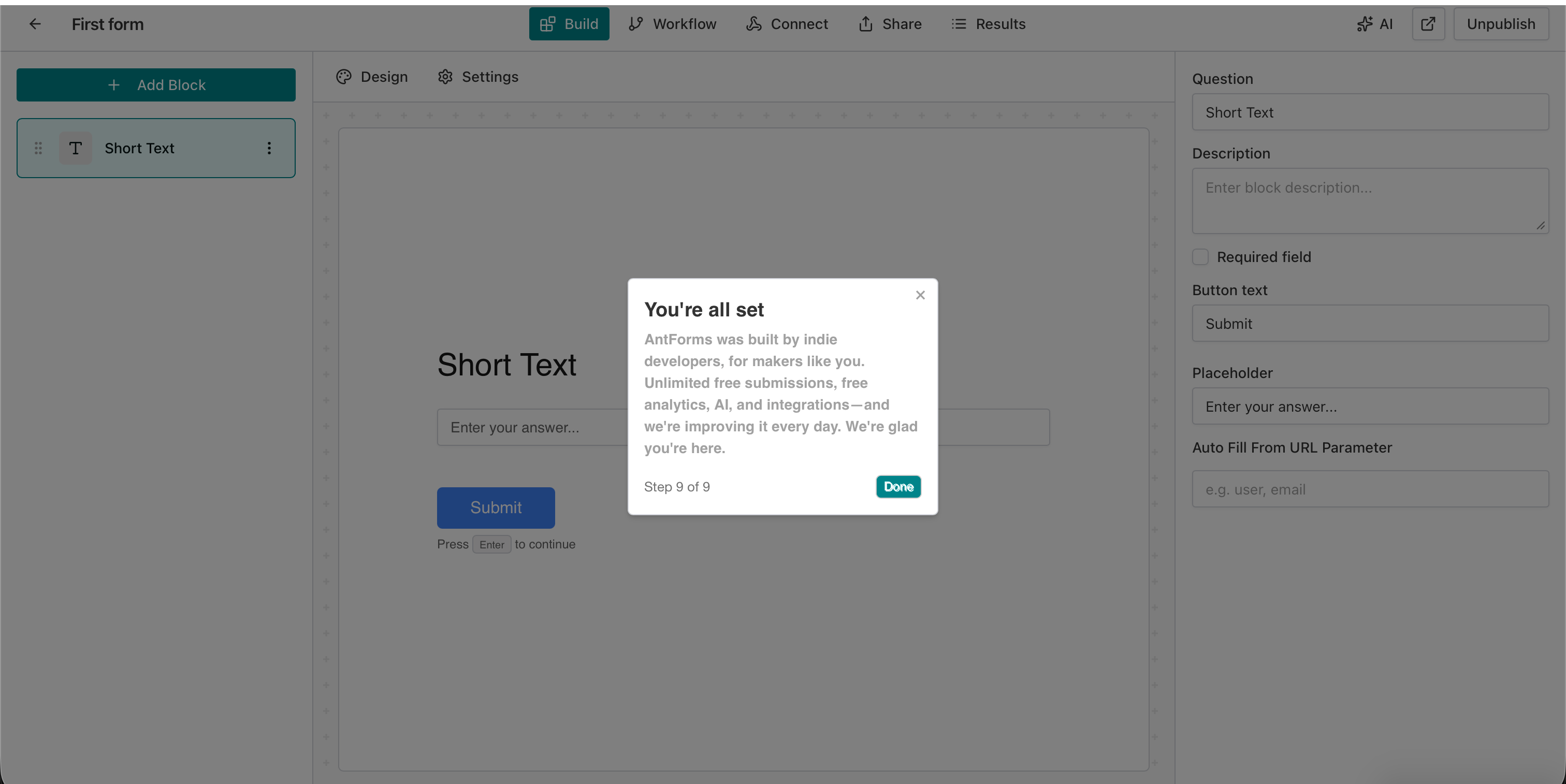
Step 9 of 9 is the closing message: “You’re all set.” The modal reinforces what the platform offers: “AntForms was built by indie developers, for makers like you. Unlimited free submissions, free analytics, AI, and integrations—and we’re improving it every day. We’re glad you’re here.” The user has completed the full path: create → name → open → add question → publish → view live. They now understand how the platform works and have a live form to show for it.
With vs Without Onboarding: A Quick Comparison
| Aspect | Without onboarding | With simple onboarding (e.g. 9 steps) |
|---|---|---|
| First-session outcome | User often leaves without creating anything | User creates and publishes a form |
| ”How does this work?” | User must guess or leave to read docs | In-product tooltips and steps answer it |
| Time to first value | Unpredictable; many never get there | Short path to “form is live” |
| Churn risk | Higher early churn (40–60% never return) | Lower when users reach aha moment |
| Support load | More “where do I start?” questions | Fewer; onboarding does the teaching |
AntForms’ 9-step onboarding fits the “with onboarding” column: it assists the user so they understand how the platform works and reach a concrete outcome (a published form) in one sitting.
Why This Matters for Form Builders and Makers
For form builders, onboarding matters because the product has many concepts—forms, blocks, question types, workflow, publish, share—that are not self-explanatory. A simple onboarding flow turns that complexity into a linear path.
Makers and indie hackers don’t want to read docs before they build. They want to create a form, add a few questions, and publish. AntForms’ 9-step flow mirrors that intent: it assists the user from “no forms yet” to “form is live” without requiring prior knowledge. That’s how a product onboarding system should work—it doesn’t replace the product; it guides the user so they can succeed on day one.
What to Look for in a Form Builder’s Onboarding
When you’re choosing a form builder—or building one—onboarding quality is a signal of how much the team cares about the first-run experience. Look for: (1) clear progress (“Step X of Y”) so users know how long the tour is; (2) contextual tooltips that point to the actual UI element (e.g. “Click here to create your first form”) instead of generic advice; (3) one primary path (create → add questions → publish) rather than a tour of every feature; (4) skip option so power users aren’t blocked; and (5) a closing moment that reinforces value (e.g. “You’re all set” plus a short pitch). AntForms’ flow hits all of these: the 9 steps are ordered by time and match the real user journey, and the final step ties the experience back to unlimited submissions, free analytics, and AI—so the user leaves with both a live form and a clear picture of why the platform is built for makers. For more on designing flows that keep users moving, see momentum-driven forms and user journeys and strategic intake forms and product experience.
Key Takeaways and Next Steps
Products need an onboarding system because end users find it very difficult to understand how a new system works without guidance. AntForms addresses that with a simple 9-step onboarding that shows how the platform works: welcome → create form → name it → open editor → add a question (e.g. Short Text) → publish → open live form → “You’re all set.” Each step is clearly indicated and skippable, so users get assistance without being forced through a long tour.
Key takeaway: Onboarding isn’t optional—it’s the bridge between signup and value. When we forget how hard it is for the end user to understand the system, we lose them. A short, clear, step-by-step tour that assists the user from first action to first success is one of the highest-leverage investments a product can make. If you’re building or choosing a form builder in 2026, look for one that answers “how does the platform work?” inside the product—with a simple onboarding that gets you from zero to your first published form in minutes, just like AntForms’ 9-step guide.
Ready to try a form builder that guides you from day one? Try AntForms for free today and experience the 9-step onboarding yourself—from welcome to first published form in minutes, with clear guidance at every step.
For more, read SaaS onboarding templates that reduce churn, reduce churn with feedback loops, and what you can build with AntForms. Understanding why products need onboarding—and how a simple tour assists users—is the first step to building products that stick.